


BitCloudFarm Miner, BTC Mining
4.5144.00 Reviews
App Specs
- Version
- 9.0
- Updated On
- License
- Free
- Downloads
- 100,000+
- Developer
- Crypto Mine Solution
- Categories
- Finance
- Platform
- Android
Screenshots
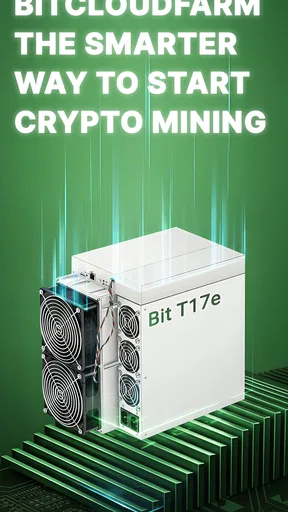
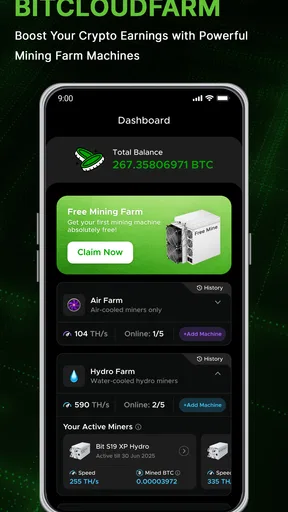
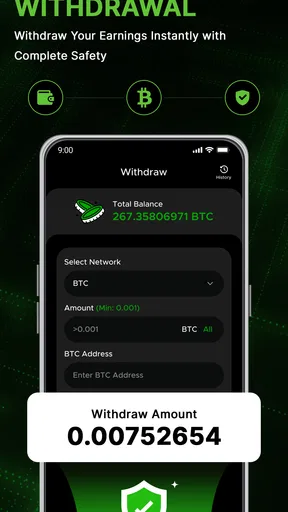
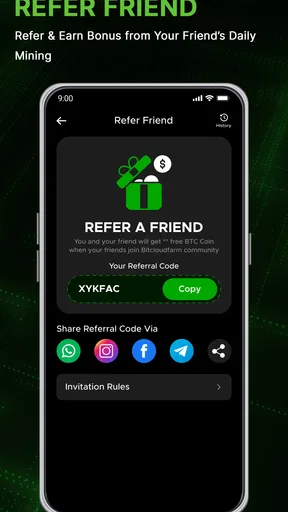
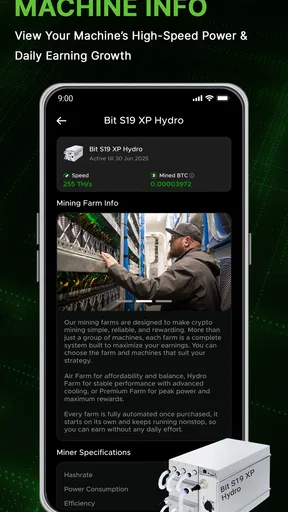

 Analysis by AppCompare
When I consider a phone-based crypto app, I look first at what it makes easier and what it asks me to trust. BitCloudFarm Miner is a free finance app from Crypto Mine Solution, built around the idea of accessing BTC mining rewards through a cloud-farm setup rather than running mining equipment at home. That distinction is the useful starting point: it offers a low-friction way to explore the subject, but it is not the same thing as personally operating a Bitcoin mining rig.
A cloud-farm approach, not a home mining rig
The app’s central appeal is that it turns mining into a phone-based activity. In practical terms, that means I can check in and follow the experience without buying, configuring, or maintaining specialist hardware. That is a meaningful convenience for someone who is curious about mining but does not want a loud, power-hungry setup taking over a room.
It also changes what “mining” means from a user’s point of view. The phone is the place where I interact with the service, not a substitute for dedicated mining machinery. I would approach the app as a cloud-mining experience and avoid assuming that a tapping action means the handset itself is doing the computational work that secures Bitcoin.
How I would use it day to day
The straightforward presentation makes the basic routine easy to understand: open the app, review the mining activity, and check the account’s progress. That kind of short check-in is more suitable for a spare moment than for a long session. I would not keep refreshing it throughout the day; a periodic look is enough to understand whether the app remains useful to me.
A practical example is someone who has a few minutes during a commute or lunch break and wants to learn the vocabulary and rhythm of a crypto-mining service. They can use that time to inspect the dashboard and get familiar with the idea of mining power and rewards, without turning the activity into a serious investment plan. The key is to keep the financial stakes modest and treat the experience as exploration, not dependable income.
Before spending money, I would take time to understand what the app means by increasing mining power, what conditions apply to any reward, and how a withdrawal works. Those are better questions to answer before paying than after. The app is free to download, while in-app purchases range from $7.99 to $799.99 per item, so I would be especially careful not to confuse optional spending with guaranteed returns.
Who is likely to get the most from it?
I see the best fit as a curious beginner who wants an accessible introduction to a cloud-mining interface and is comfortable learning by checking a simple dashboard. It may also suit a crypto hobbyist who wants a casual, phone-friendly way to follow a mining-style service alongside other tools. Neither user should mistake convenience for proof of profitability.
Worth Reading Before You Choose

EA SPORTS FC Mobile 26 Is a Bigger Football Game, but It Takes Time

Flipboard Shows What News Apps Must Do Beyond the Feed

Switching to Android Auto Means Rethinking Your Driving Routine

Google Calendar Makes a Crowded Week Easier to Manage

Ludo King Makes the Most of the Minutes Between Plans

Baby Panda World Brings Quick Play to Modern Phones, but Its Game Library Feels Busy
If my goal were to mine Bitcoin directly, compare hardware efficiency, or make a serious decision about mining economics, I would choose a more transparent, technical route: research dedicated mining equipment and electricity costs, or use reputable market and portfolio tools for tracking holdings. A cloud-farm app removes much of the setup, but that convenience means I have less direct control over the machinery and operating details than I would with equipment I own.
Questions worth answering before committing
Can I use it without spending? The app is free to install, so I can explore its basic experience before deciding whether any purchase is worthwhile. I would keep a firm budget and would not buy a higher tier simply because a screen suggests that more mining power sounds better; first I would understand the cost, terms, and realistic route from rewards to usable funds.
Is it suitable for a child or a first-time user? Its content rating is Everyone, but a finance app involving crypto is still best approached with adult guidance for younger users. A beginner should also remember that Bitcoin values can move, and that an app’s displayed progress is not the same as cash already available in a bank account.
Does it replace a wallet or an exchange? I would not assume that it does. A mining-oriented service, a wallet used to hold assets, and an exchange used to trade them serve different purposes. Before relying on any in-app balance, I would check the available withdrawal options and make sure I understand the destination and any conditions involved.
One useful habit is to record the amount spent, if any, separately from the reward figure shown in the app. That simple comparison helps prevent a growing on-screen balance from feeling like a profit when purchases or other costs have not been considered. It is a small step, but particularly valuable in any service where rewards and paid upgrades sit side by side.
Getting Started with BitCloudFarm Miner
First things first, setting up BitCloudFarm Miner is a breeze. I was pleasantly surprised by how quickly I could get everything up and running. All you need to do is download the app from the Play Store or App Store, create an account, and you’re ready to start mining. The interface is pretty straightforward—no need to be a tech wizard here.
The User Experience
Once you're in, you'll find a clean and intuitive dashboard. Everything is laid out logically, and there's a handy little tutorial that guides you through the basics. I appreciated the simplicity, as it makes the app accessible to both newbies and seasoned miners alike.
Now, when it comes to the actual mining process, it’s as simple as tapping a button. The app allows you to mine Bitcoin without any special hardware—just your smartphone. Of course, don’t expect to get rich overnight, but it’s a nice way to dip your toes into the crypto world.
For someone deciding whether to keep it installed, I would give the dashboard a few visits before forming an opinion. A single session can show whether the layout feels clear, but repeated check-ins are more useful for judging whether the activity is understandable and worth the attention it takes. I’d focus on whether the app explains what I’m seeing, rather than treating a changing figure as evidence of a worthwhile return.
Features That Stand Out
One feature I really liked is the real-time stats. You can keep track of your mining progress, see how much you’ve earned, and even get insights into the market trends. The app updates these stats frequently, so you’re always in the know.
Another cool aspect is the built-in wallet. You can store your Bitcoin right in the app, which is super convenient. Plus, transferring your earnings to an external wallet or trading platform is a cinch. It’s nice to have everything in one place without needing multiple apps.
My main practical tip here is to distinguish three things when reviewing the screen: mining progress, the displayed reward, and funds that are actually ready to move. They may look related, but they answer different questions. I would check the app’s own wording and any withdrawal conditions before planning around a balance, and keep separate records if I am comparing it with an outside wallet.
The built-in wallet can make the routine feel tidy, but keeping an asset in one place is not automatically the best choice for every user. Someone who already manages crypto elsewhere may prefer to use a dedicated wallet for custody and a separate service for tracking. In that case, convenience inside the mining app is less important than having a process they already understand and control.
Rewards and Incentives
BitCloudFarm Miner also offers some fun incentives to keep you motivated. The app includes a referral program, which rewards you for bringing in new users. You get a percentage of their earnings, which is a sweet little bonus. It's a great way to earn more without putting in extra effort.
Additionally, the app occasionally runs promotions and giveaways, allowing you to earn extra crypto. These promotions are announced via notifications, so make sure you have them enabled to not miss out.
I would treat referrals and promotions as optional extras, not as the foundation of a plan. Referral rewards depend on other people joining and using the service, so they are not a reliable substitute for understanding the basic mining experience. If I prefer not to invite friends into a financial app, I can simply ignore that route and decide whether the core activity is worthwhile on its own.
Notifications can help surface a promotion, but I would keep them purposeful rather than letting every alert pull me back into the app. A calmer approach is to check when I choose, then review any offer carefully before acting. That makes it easier to separate a genuine personal interest in the app from the pressure to respond quickly to an incentive.
Security: A Top Priority
Now, let’s talk about security. With any app dealing with finances, security is a huge concern. BitCloudFarm Miner uses advanced encryption to protect your data and funds. They’ve also implemented two-factor authentication for an added layer of security. It’s reassuring to see that they take these precautions seriously.
Even with those protections, I would use sensible account habits: choose a unique password, keep access to the second authentication factor secure, and avoid signing in on a device I do not control. I would also be cautious about messages asking me to reveal login details or move funds. Security features reduce certain risks; they do not remove the need to protect the account personally.
What Could Be Improved?
While I had a generally positive experience, there are a couple of areas where the app could improve. The app does consume a fair amount of battery, which isn’t ideal if you’re on the go. Also, it would be nice to have more detailed tutorials or guides for those completely new to the crypto space.
Battery use matters most if the app becomes part of an all-day routine. I would check its impact during ordinary use and avoid leaving it open unnecessarily, especially when I need my phone for navigation or work. A mining-style app should not take priority over basic phone tasks, and anyone who notices a meaningful drain may be happier checking it briefly rather than keeping it active.
Another point to consider is the earning potential. While this is a passive way to earn Bitcoin, the returns are modest unless you're deeply invested in the referral program. But, hey, every bit counts!
For a fair comparison, I would put this beside the usual alternatives in finance rather than judge it only against other mining apps. A portfolio tracker is better for monitoring assets already held; an exchange is designed for buying or selling; and a hardware-mining setup offers a more direct relationship with equipment, but requires research, cost, and ongoing attention. BitCloudFarm Miner’s appeal is the lighter entry point, while its trade-off is that the cloud-farm model gives the user less hands-on control than owning hardware.
That makes it a poor fit for anyone who needs predictable returns, wants to avoid crypto risk, or is uncomfortable with paid upgrades and account-based services. I would also steer away if I were planning to spend money I could not afford to lose, or if I needed a tool primarily for tax records, detailed portfolio analysis, or direct control over mining hardware. A dedicated tool for those jobs is likely to be clearer.
Lastly, the app occasionally experiences slowdowns, especially when there’s heavy traffic. It’s not a deal-breaker, but it can be a tad frustrating if you’re trying to check your stats quickly.
In everyday use, that slowdown is a reason not to rely on the app for a time-sensitive financial decision. If I want to check a figure before making a move elsewhere, I would verify it through the relevant wallet or trading service too. For casual learning, a delayed screen is an annoyance; for a decision involving money, I would want the information from the service where I intend to act.
Final Thoughts
In conclusion, BitCloudFarm Miner is a solid choice for anyone interested in exploring cryptocurrency mining without diving into the complexities of hardware and technical setups. It's user-friendly, secure, and offers a simple way to earn Bitcoin passively. While it has its limitations, especially in terms of earnings and battery usage, it’s a fun and easy way to get started with crypto mining.
As an app, it has a 4.6 average from 546 ratings, with 133 written reviews and over 100,000 installs. It is free to download, rated Everyone, and its current version is 9.0 for devices running Android 7.0 or later. Those figures suggest a sizable audience, but I would still make my choice based on whether the cloud-farm approach and the app’s routine suit me, not on popularity alone.
The version and device requirements are worth checking before installing, especially if I am using an older phone. Since in-app purchases can be substantial, I would explore the no-cost experience first and decide in advance what, if anything, I am willing to spend. I would also keep expectations grounded: convenience is the strongest reason to try it, not a promise that mining will become a meaningful source of income.
So, if you're curious about the world of Bitcoin and want to see what mining is all about, give BitCloudFarm Miner a try. It’s a neat little app that could just be your gateway into the exciting world of cryptocurrencies. Happy mining!
Pros
- User-friendly interface for easy navigation.
- Low battery consumption during mining.
- Supports multiple cryptocurrencies.
- Detailed analytics and performance tracking.
- Frequent updates with new features.
Cons
- Requires constant internet connection.
- Limited customer support options.
- May slow down older devices.
- Ads can be intrusive at times.
- Earnings can be inconsistent.
FAQs for BitCloudFarm Miner, BTC Mining
What is BitCloudFarm Miner and how does it work?
BitCloudFarm Miner is an application designed for mobile devices that allows users to participate in cryptocurrency mining, specifically Bitcoin, using cloud-based technology. Users can invest in virtual mining rigs and earn Bitcoin without the need for physical hardware. The app connects to remote servers to perform mining operations, making it accessible for beginners.
Is BitCloudFarm Miner safe to use?
BitCloudFarm Miner implements several security measures to protect user data and transactions. However, as with any app dealing with cryptocurrency, it's crucial to exercise caution. Ensure that you download the app from official app stores and keep your personal information secure. It's also wise to read user reviews and check for any reported security issues.
What are the costs associated with using BitCloudFarm Miner?
While the BitCloudFarm Miner app itself may be free to download, there are typically costs associated with mining. Users often need to purchase mining plans or virtual rigs to start earning Bitcoin. These costs can vary, so it's important to review the pricing structure within the app and consider your budget before investing.
How much can I earn using BitCloudFarm Miner?
Earnings from BitCloudFarm Miner depend on several factors, including the mining plan you choose and current Bitcoin market conditions. While some users report steady earnings, it's important to note that cryptocurrency mining can be volatile. Potential earnings should be weighed against investment costs and market fluctuations.
Can I use BitCloudFarm Miner on both Android and iOS devices?
Yes, BitCloudFarm Miner is available for both Android and iOS platforms. You can download the app from the Google Play Store for Android devices and the App Store for iOS devices. Ensure your device meets the app's requirements for optimal performance and check for any platform-specific features or limitations.


